WordPress performance optimization starts with finding the bottleneck. Server response times, Core Web Vitals, and application diagnostics help you understand if a site needs targeted fixes, technical cleanup, or a rebuild.
Common causes: Slow hosting, resource-heavy plugins and themes, inefficient database queries, and excessive front-end scripts
Diagnosis: PageSpeed Insights, Core Web Vitals, and request diagnostics help pinpoint performance issues
Caching limits: Caching speeds up page delivery but does not fix slow database queries or dynamic operations
Lasting performance: Baseline measurements, controlled releases, and monitoring help catch regressions
When to rebuild: Persistent technical debt or architectural limitations may make redevelopment more practical than repeated fixes.
Best for: Agencies, brands, and in-house teams deciding how to diagnose WordPress performance issues and whether to optimize, stabilize, or rebuild a website.
WordPress performance issues can stem from slow server responses, inefficient database queries, caching problems, heavy theme or plugin code, or excessive front-end scripts. To identify the actual bottleneck, start by measuring representative pages and separating server-side delays from rendering and interaction problems.
Use PageSpeed Insights to assess Core Web Vitals, then examine request timings, resource loading, and differences between page templates. Test both cached and uncached pages, including logged-in or dynamic flows where relevant. This helps determine whether a slow WordPress site needs a targeted configuration change, code optimization, or more extensive engineering work.
Once you identify the cause, prioritize the changes with the greatest expected impact, implement them in a controlled environment, and retest against your baseline. Effective WordPress performance optimization also requires checking that improvements don’t disrupt forms, checkout, tracking, or other critical functionality.
If performance problems repeatedly return after updates or traffic increases, investigate underlying technical debt and architectural constraints. Recurring issues may justify structured stabilization, while redevelopment becomes an option when the existing architecture cannot support reliable performance and maintenance.
Where is your WordPress website slowing down?
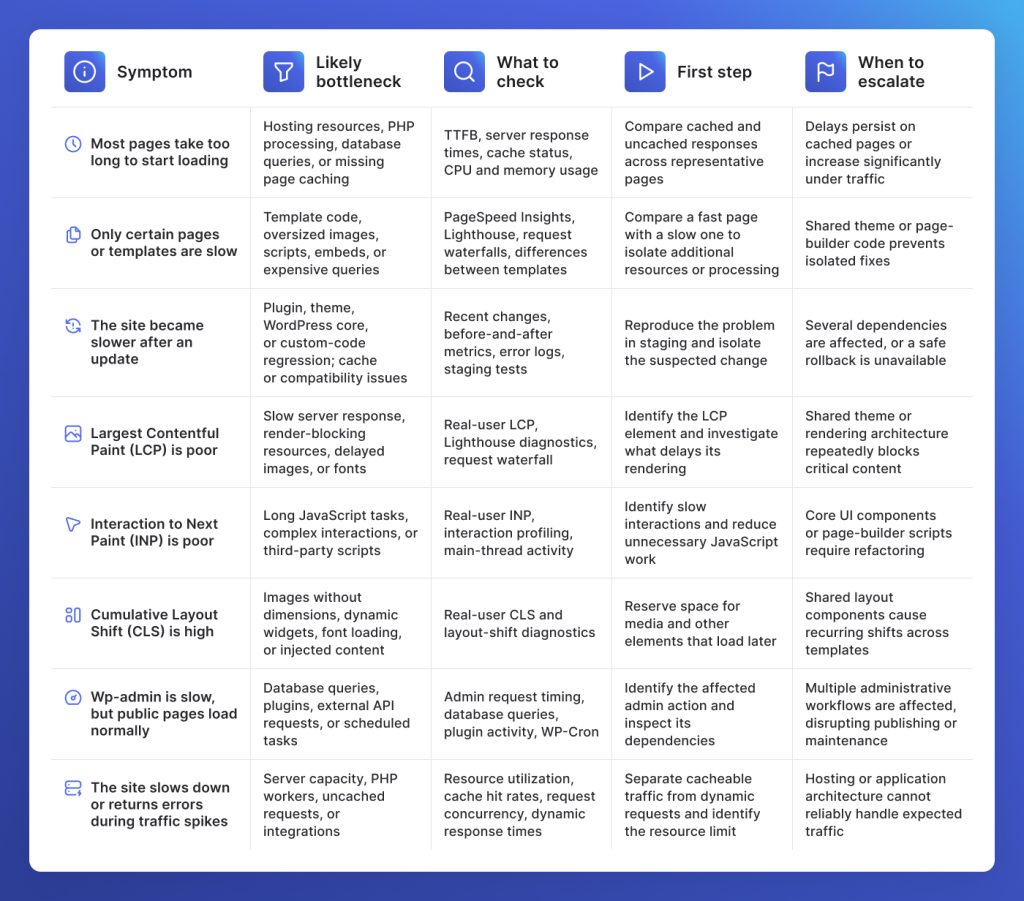
A slow WordPress site doesn’t always have the same problem. One site may struggle to generate pages because of slow database queries, while another delivers HTML quickly but keeps visitors waiting for images, scripts, or interactive elements. The symptoms may look similar, but the fixes can be entirely different.
The quickest way to narrow down WordPress performance issues is to look for patterns. Are all pages affected, or only certain templates? Does the slowdown happen before content appears, when someone interacts with the page, or during traffic spikes? Did performance drop immediately after an update?
These distinctions help identify which part of the system deserves attention first.
Measure before you optimize a WordPress website
Before making changes to a slow WordPress site, establish where the delay occurs, which pages or interactions are affected, and whether the problem is consistent or intermittent. A useful WordPress performance audit should produce evidence that developers can reproduce, compare, and act on. Otherwise, even a successful optimization may address the wrong problem.
Field data (Chrome User Experience Report, or CrUX) reflects actual Chrome users’ experiences over a rolling 28-day period, where sufficient data is available. It helps establish whether visitors consistently experience slow loading or poor responsiveness.
Lab data (Lighthouse) tests a page under controlled conditions. It helps developers investigate rendering delays, network requests, JavaScript execution, and other potential bottlenecks.
The two may disagree. Real visitors use different devices and networks, interact with pages differently, and arrive with varying cache states. Lab tests use simulated conditions and may miss problems that occur during longer sessions or under specific traffic patterns.
A Lighthouse/PageSpeed score is not the goal itself. The objective is better real-user performance and a reproducible diagnosis. Use field data to establish priorities and lab tests to investigate what causes the delays.
Test representative page types and critical interactions
Testing only the homepage can hide serious WordPress site speed problems. Different templates load different assets, execute different queries, and rely on different integrations.
Build a small test set that reflects how the site actually operates:
Public pages: high-traffic landing pages, articles, and resource-heavy templates.
Interactive journeys: forms, search, filters, and other actions that trigger JavaScript or server requests.
Dynamic pages: logged-in areas, WooCommerce cart and checkout flows, or personalized content where applicable.
Editorial workflows: WordPress admin screens if content editors report slow publishing, saving, or navigation.
Compare mobile and desktop results, prioritizing the devices and network conditions that represent actual visitors. Also test critical interactions rather than measuring initial page loading alone.
Separate server delay from rendering and interaction delay
WordPress Core Web Vitals provide useful signals, but each metric points to a different part of the experience:
TTFB (Time to First Byte) helps investigate server and network response delays. It is a supporting diagnostic metric, not a Core Web Vital.
LCP (Largest Contentful Paint) measures when the main visible content appears.
INP (Interaction to Next Paint) measures responsiveness to user interactions.
Use request waterfalls and browser performance profiling to investigate the relevant layer.
For example, high TTFB on uncached requests may warrant examining PHP execution, database queries, or external API dependencies. A normal TTFB combined with poor LCP suggests investigating critical images, fonts, or render-blocking resources. Poor INP may require identifying long JavaScript tasks rather than changing hosting.
Establish a baseline and recent-change timeline
Before implementing WordPress performance optimization, record the affected URLs, test conditions, key metrics, cache state, and current site configuration.
Then reconstruct what changed before performance deteriorated:
WordPress core, plugin, theme, or PHP updates.
New analytics tags, third-party scripts, or integrations.
Content, template, or page-builder changes.
Hosting migrations, CDN configuration changes, or traffic increases.
Where possible, change one variable at a time in staging and repeat the same tests. Document the results, including whether the change affects critical functionality.
This baseline allows the team to distinguish a measurable improvement from normal test variability and prevents repeated troubleshooting when performance problems return.
Launch faster. Grow easy. Stay safe.
Handle more visitors with custom WordPress development
8 Common root causes of WordPress performance issues
WordPress performance issues can originate in the hosting environment, database, application code, or resources delivered to the browser. Several bottlenecks may exist simultaneously, which is why improving one metric doesn’t always make the entire site faster.
The following eight areas cover the most common sources of slowdowns, what evidence to look for, and which fixes address the underlying problem.
1. Slow hosting, server response, or resource limits
Your hosting environment handles incoming requests, executes PHP, accesses the database, and delivers responses. When available resources cannot keep up with demand, pages may respond slowly even before the browser begins rendering content.
What to investigate:
Server response: Check TTFB across cached and uncached requests.
Resource utilization: Look for CPU or memory saturation, PHP worker exhaustion, and database latency.
Traffic patterns: Compare normal traffic with campaign peaks and concurrent requests.
Server logs and hosting metrics can help distinguish persistent infrastructure limitations from temporary load spikes. Geographic distance between users and the origin server may also contribute to response delays.
If infrastructure is the constraint, increasing capacity, adjusting PHP worker allocation, improving database resources, or changing the hosting configuration may help.
Keep in mind: Faster hosting cannot compensate for oversized images, excessive JavaScript, or inefficient application code. Confirm that server capacity is the limiting factor before migrating.
2. Missing or misconfigured caching
Caching reduces repeated processing and data transfer, but different caching layers solve different problems.
CDN/edge caching delivers eligible resources or cached pages from locations closer to visitors.
Browser caching lets returning visitors reuse static assets instead of downloading them again.
Object caching stores reusable application data and query results, reducing repeated database operations.
Check cache hit rates, response headers, TTFB differences between cached and uncached requests, and whether cache exclusions match the site’s functionality.
The limitation: Full-page caching generally cannot handle personalized or authenticated requests in the same way as public pages. Cart, account, search, API, and other dynamic flows may still require substantial server processing.
A durable caching strategy must account for both public content delivery and application behavior. Installing another caching plugin without understanding existing cache layers can introduce conflicts rather than improvements.
3. Heavy themes, page builders, or custom template code
Themes and page builders determine how WordPress generates page structures and loads front-end resources. Their implementation can introduce unnecessary CSS, JavaScript, complex DOM structures, repeated libraries, and expensive template queries.
Typical symptoms include slow landing pages, delayed interactions, or performance differences between templates sharing the same hosting environment.
Compare fast and slow templates using Lighthouse, browser performance profiles, and network waterfalls. Look for:
Unused features and large CSS/JavaScript bundles.
Scripts loaded globally despite being needed on only a few pages.
Excessive DOM complexity, animations, or repeated components.
Custom template queries and rendering logic that increase processing time.
Durable improvements may involve removing unnecessary dependencies, loading assets conditionally, simplifying components, or refactoring expensive template logic. These changes also depend on sound WordPress front-end best practices, particularly when shared components affect multiple pages.
4. Plugin behavior, overlap, and expensive queries
Plugins extend WordPress functionality, but their performance impact depends on what they execute, not how many are installed.
One plugin making expensive database queries or repeated external API calls can create more overhead than several lightweight plugins.
A WordPress plugin performance audit should examine:
Slow or duplicated database queries.
CSS and JavaScript loaded on unrelated pages.
Large autoloaded options in wp_options.
Scheduled tasks, background processing, and external requests.
Overlapping functionality and abandoned dependencies.
Query profiling, request timing, and background-task monitoring can help identify the responsible component.
Possible fixes include removing redundant functionality, restricting asset loading, optimizing queries, or replacing poorly maintained dependencies.
Avoid disabling plugins randomly in production. Test suspected components in staging, verify their dependencies, and confirm that removing them won’t disrupt business-critical functionality.
5. Images, video, and font delivery
Media assets can delay visible content even when server responses are fast. Common causes include oversized images, inappropriate dimensions, heavy video embeds, and excessive font files.
Inspect transfer sizes, image dimensions, request priorities, and the resources contributing to LCP.
Prioritize these improvements:
Images: Serve correctly sized, compressed, responsive assets using appropriate formats such as WebP or AVIF.
LCP resources: Ensure the main image is discovered and loaded promptly rather than lazy-loaded by default.
Below-the-fold media: Apply lazy loading where it reduces initial page work.
Video and embeds: Consider lightweight previews or click-to-load implementations.
Fonts: Limit unnecessary families and weights, and inspect whether font loading causes layout shifts.
WordPress supports responsive image delivery, but poorly configured themes or custom implementations can undermine it.
Optimize the delivery path. A compressed hero image may still appear late if CSS or JavaScript delays its discovery.
It means that even if your main image is small, it will load slowly if your site’s hidden code makes the browser wait to find it.
6. JavaScript, CSS, and third-party scripts
Front-end scripts control interactions and presentation, but they can also block rendering or occupy the browser’s main thread.
A site may load its main content reasonably quickly while still responding slowly to clicks, menus, filters, or form inputs.
Use browser performance profiling to identify long JavaScript tasks, render-blocking stylesheets, and unnecessary resource loading. Pay particular attention to analytics, chat widgets, heatmaps, consent tools, advertising scripts, and embedded services.
Potential fixes include removing unused code, loading scripts only on relevant pages, deferring non-critical execution, and improving critical CSS delivery.
Making code files smaller only helps so much. If your site is running bloated scripts or crowded with tracking tags, it will still load slowly and feel laggy to users.
7. Database bloat and background work
WordPress relies on database queries for content, settings, and application behavior. Inefficient queries and excessive background processing can slow both public pages and administrative workflows.
Symptoms include slow wp-admin screens, delayed content saving, inconsistent response times, and increased database load.
Investigate slow or duplicated queries, large autoloaded wp_options entries, accumulated revisions, transients, orphaned plugin data, and scheduled WP-Cron tasks. Query plans, indexing, and data structures may also need attention on complex sites.
Durable fixes can include targeted query optimization, appropriate indexing, removing verified unused data, and rescheduling expensive background operations.
Database size alone doesn’t establish a performance problem. A large, well-indexed database may perform better than a smaller one with inefficient queries.
Never delete options, transients, or other records blindly. Back up the database, establish a baseline, and measure the effect of each cleanup operation.
8. Dynamic traffic and uncached application paths
Some WordPress functionality requires processing every request rather than serving cached HTML.
WooCommerce carts and checkouts, membership areas, learning platforms, personalized content, site search, and authenticated admin sessions are common examples.
These workflows depend on application logic, database operations, user-specific data, and sometimes external integrations.
Compare cached public-page performance with uncached transaction timings, database activity, PHP worker utilization, and API response times under realistic concurrency.
Durable improvements may require optimizing application queries, reducing synchronous external calls, adjusting server capacity, or redesigning expensive workflows.
Making a busy WordPress site fast isn’t just about small speed tweaks; it’s about how many visitors your server can handle at once. Finding and fixing slow database calls, overloaded background processes, and sluggish third-party connections usually restores speed without forcing an expensive server upgrade, unless your site has outgrown its current setup entirely.
Core Web Vitals for WordPress: What each metric points to
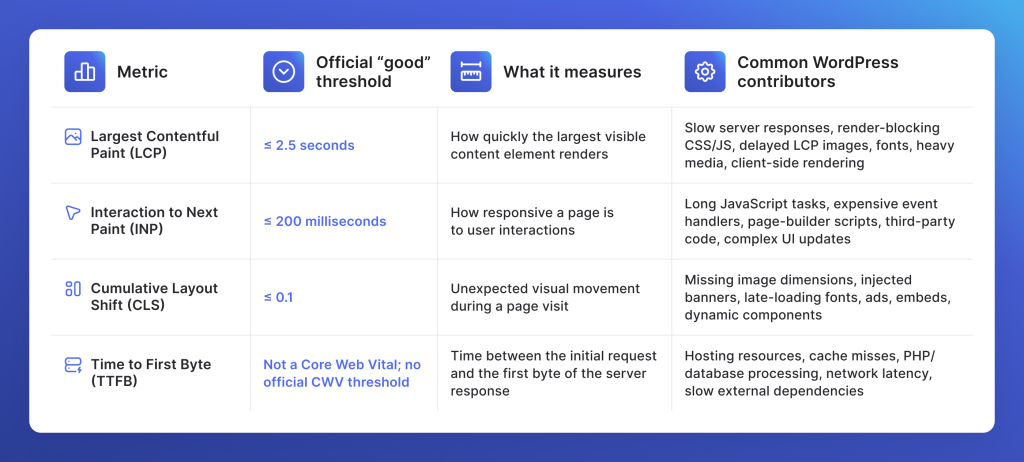
Core Web Vitals measure three aspects of user experience: loading performance, responsiveness, and visual stability. For WordPress sites, they help narrow down which performance problems visitors encounter and which components may require investigation.
Google classifies Core Web Vitals using the 75th percentile of page views, meaning at least 75% of measured visits must meet the recommended threshold for a metric to receive a “good” rating. These thresholds apply to real-user data, where sufficient measurements are available.
What to do when WordPress performance degrades after an update
If WordPress performance degraded after an update, first identify what changed and when the slowdown began. A plugin, theme, WordPress core, or PHP update may introduce a compatibility issue, increase database processing, or change how scripts load. However, the timing alone doesn’t prove that the update caused the problem.
A reliable WordPress update performance issue investigation should follow a controlled sequence, preserving evidence before making further changes.
1. Identify the change and establish when the slowdown started
Check deployment records, update logs, and available performance monitoring data. Look beyond WordPress updates to changes in hosting, CDN configuration, tracking scripts, integrations, content, or page templates.
If historical measurements exist, compare the same pages and interactions before and after the suspected change. Use consistent test conditions where possible to avoid confusing normal performance variation with a regression.
2. Determine which performance layer is affected
The next step is to locate the slowdown before modifying configurations.
Server-side: Increased TTFB, slower wp-admin requests, or delayed API responses may indicate PHP processing, database, or infrastructure problems.
Front-end: Larger assets, additional CSS/JavaScript, or changed resource-loading behavior may explain slower rendering.
Interactions: Poor INP or newly sluggish menus, filters, and forms may point to expensive JavaScript execution.
Compare the affected pages with unaffected ones. This helps narrow the investigation to a shared component, specific template, or application workflow.
3. Review logs and caching behavior
Inspect available PHP errors, server and application logs, and CDN/cache response data. Check whether the update changed cache behavior, triggered repeated requests, or introduced errors that coincide with slower response times.
Capture the evidence before clearing caches or changing multiple settings. Otherwise, the original conditions may disappear, making the regression difficult to reproduce and its cause harder to confirm.
4. Isolate the suspected change in a safe environment
Reproduce the problem in staging or another controlled environment where practical. Test one suspected component or configuration change at a time, comparing results against the original baseline.
Before disabling plugins, changing PHP versions, or rolling back themes, confirm that a tested backup and recovery procedure is available.
Once a fix is identified, verify critical functionality, including forms, analytics, checkout, and external integrations. Performance improvements are only useful if the affected workflows continue operating correctly.
5. Decide whether rollback or stabilization is necessary
Rollback can restore service and help confirm whether a specific change introduced the regression. It is a recovery and diagnostic measure.
If the issue stems from an isolated defect, a compatible update or targeted code correction may resolve it. If several dependencies break together, updates repeatedly cause regressions, or the existing code cannot support current software safely, the site may need structured stabilization.
That work can involve dependency cleanup, compatibility fixes, code refactoring, and a more reliable release process. Permanently retaining outdated WordPress, plugin, or PHP versions leaves compatibility and security risks unresolved.
GetDevDone scopes integrations before the build starts
WordPress performance optimization: What to fix first
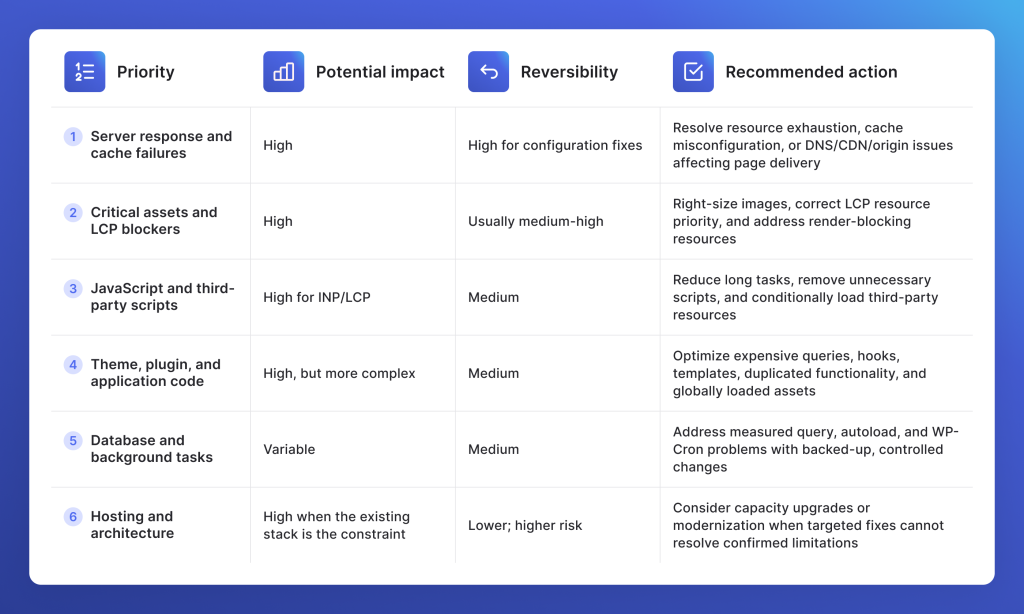
Once you’ve identified the bottleneck, prioritize fixes by their measurable impact, implementation risk, and reversibility. The order depends on what the performance audit reveals. A site struggling with server response times requires a different approach from one with acceptable loading performance but poor responsiveness.
Start by evaluating three factors:
Impact: Which issue contributes most to the measured performance problem?
Reversibility: Can the change be tested and rolled back without disrupting critical functionality?
Dependencies: Does the fix affect an isolated resource or shared code, integrations, and business workflows?
Use the following matrix to determine where to focus. The priorities reflect typical impact and implementation risk, but they should be adjusted to the site’s actual bottlenecks.
Let the evidence determine the order
These priorities aren’t a mandatory sequence. If field data shows poor INP while server response and LCP are acceptable, investigating JavaScript execution should take precedence over cache tuning. Conversely, persistent TTFB problems on uncached requests justify examining PHP, database activity, and server capacity before modifying front-end assets.
The same principle applies to the scope of changes. An oversized LCP image may require a contained asset fix. A theme that generates excessive scripts across dozens of templates may require changes to shared components. Both can affect loading performance, but their implementation risks and maintenance implications differ substantially.
Use the smallest intervention that addresses the confirmed cause. Before making a broader code change, determine whether a configuration adjustment or isolated optimization can deliver the required improvement. If the bottleneck originates in shared application logic, avoid accumulating temporary workarounds that will need to be maintained across future releases.
Validate the result before moving on
Retest after each meaningful change against the original baseline, using comparable pages, devices, cache states, and interactions. Record both the performance improvement and any side effects.
Validation should cover the functionality affected by the change:
Script optimization: Confirm analytics, consent management, forms, and interactive components still work.
Caching changes: Verify authenticated sessions, personalized content, and checkout behavior.
Code or database changes: Check relevant templates, administrative workflows, and integrations.
Front-end changes: Recheck responsive behavior, keyboard accessibility, and visual stability.
A higher Lighthouse score does not justify broken tracking, inaccessible controls, or unreliable transactions.
Escalate when targeted fixes cannot resolve the constraint
More extensive engineering work becomes appropriate when measured bottlenecks persist after scoped optimization, necessary changes affect tightly coupled components, or infrastructure cannot support expected request volumes.
A hosting upgrade may address genuine capacity limitations, but it won’t correct inefficient queries or excessive JavaScript. Likewise, redevelopment should be considered when architectural constraints make further optimization difficult to implement or maintain safely.
The outcome of each optimization cycle should inform the next decision: continue with contained fixes, address accumulated technical debt through structured cleanup, or evaluate a larger architectural change.
When quick fixes are enough and when the site needs engineering cleanup
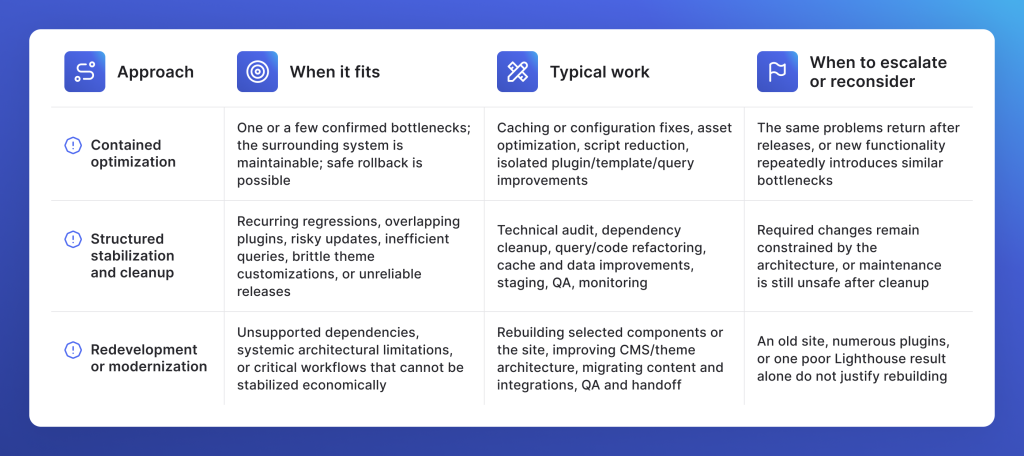
Not every WordPress performance issue requires extensive development work. Some slowdowns come from isolated configuration errors, oversized assets, or inefficient scripts that can be corrected without changing the underlying architecture. Others persist because multiple components depend on outdated code, overlapping plugins, or fragile customizations.
The decision should depend on how widespread the problem is, whether fixes remain effective after updates, and how safely the site can be maintained. A performance audit should provide enough evidence to distinguish three possible approaches.
When contained optimization is sufficient
A targeted fix makes sense when the cause is clearly identified, and the surrounding system can support the change without introducing new dependencies.
For example, if a landing page has poor LCP because its main image is loaded late, correcting resource priority may resolve the issue. If uncached requests are slow because of one expensive database query, optimizing that query may be sufficient.
The important condition is whether the improvement remains stable. If the same problem returns after routine releases, the original fix may have addressed only part of the underlying issue.
When structured cleanup becomes necessary
WordPress performance cleanup becomes more appropriate when individual fixes are technically possible but increasingly difficult to implement safely.
This is common in inherited sites where plugins duplicate functionality, customizations depend on undocumented behavior, or updates repeatedly introduce regressions. Performance problems may also be one symptom of broader common WordPress problems involving compatibility, maintainability, and unreliable workflows.
In these cases, WordPress technical debt affects more than loading speed. It increases the effort required to diagnose problems, deploy updates, and verify that changes haven’t broken existing functionality.
Structured stabilization addresses those dependencies through targeted code improvements, plugin rationalization, controlled releases, and regression testing. The goal is to make future changes safer and reduce recurring maintenance work.
When redevelopment is justified
The question of when WordPress is not enough often arises when repeated optimization fails to produce sustainable results. However, the limitation may lie in the site’s current implementation rather than WordPress itself.
Redevelopment becomes a reasonable option when the architecture prevents necessary performance improvements, critical dependencies are unsupported, or maintaining existing workflows requires increasingly expensive workarounds.
Before choosing this route, assess whether individual components can be replaced or refactored without rebuilding the entire site. Compare the cost and risk of continued stabilization against selective modernization or full redevelopment, including migration, integration testing, and ongoing maintenance.
The appropriate scope is the smallest one that resolves the confirmed constraints and leaves the site maintainable. A contained fix may be sufficient, structured cleanup may extend the useful life of the existing implementation, and redevelopment should remain an evidence-based decision when the other approaches cannot meet the site’s requirements.
How to prevent WordPress performance regressions
A WordPress site can perform well after optimization and gradually slow down as new plugins, tracking scripts, content, and integrations are added. These changes often come from different teams, making their cumulative impact difficult to track. Without a shared performance baseline and release controls, regressions can go unnoticed until they affect user experience or critical business workflows.
To keep performance predictable, businesses and their development partners need practical controls built into everyday website maintenance.
Establish performance baselines and release controls
Maintain a performance baseline for representative templates and business-critical workflows, including landing pages, forms, search, and checkout where applicable. Track Core Web Vitals, server response times, and relevant interaction metrics to identify changes against established performance levels.
Use staging and controlled deployments for WordPress core, plugins, theme, PHP, and significant integration updates. Define the scope of each release, test affected functionality, and maintain a verified rollback procedure.
A documented baseline helps distinguish new regressions from existing problems. Controlled releases make it easier to isolate the responsible change without disrupting the live website.
Manage plugins, content, and third-party dependencies
Assign ownership to installed plugins and document their purpose, dependencies, and removal criteria. Regularly review overlapping functionality, unsupported extensions, and unnecessary resource loading. This reduces hidden dependencies that can complicate updates and introduce recurring performance issues.
Set practical content standards for everyone publishing to the site:
Images: Define appropriate dimensions, compression requirements, and responsive image handling.
Video and embeds: Establish rules for embedding external content and loading resource-heavy elements.
Custom components: Follow maintainable WordPress front-end best practices, including conditional asset loading and avoiding unnecessary CSS and JavaScript.
Third-party scripts also require oversight. Analytics, chat widgets, heatmaps, A/B testing tools, consent management, and advertising tags should be included in the site’s performance budget. Assess their loading behavior and resource cost before adding new tools or campaign integrations.
These controls help prevent gradual performance degradation caused by content bloat, overlapping functionality, and accumulating third-party scripts.
Validate releases and monitor performance over time
After deployment, run performance and functional smoke tests on representative mobile and desktop configurations. Prioritize workflows affected by the release:
Forms and checkout: Verify submissions, transactions, and connected integrations.
Analytics and tracking: Confirm that important events and conversion measurements remain accurate.
Interactive elements: Test navigation, filters, and other components for functional or responsiveness issues.
Stop guessing what converts
Get website analytics and conversion tracking you can trust
Where sufficient traffic data is available, monitor real-user performance trends rather than relying on individual Lighthouse scores. Investigate sustained changes in Core Web Vitals, response times, or specific page groups, particularly after releases or major campaigns.
Document known performance constraints, cache exclusions, dynamic routes, third-party integrations, and rollback procedures. Keep this information accessible to internal teams and external development partners so future changes don’t depend on undocumented assumptions.
Consistent performance governance reduces the effort spent investigating recurring failures and makes routine updates more predictable. It also helps businesses and their development teams introduce new functionality without repeatedly revisiting the same technical problems.
How GetDevDone approaches WordPress performance work
WordPress performance problems vary in scope. Some require a targeted fix to caching, assets, or server configuration. Others involve legacy code, conflicting dependencies, or architectural constraints that make isolated improvements difficult to maintain. At GetDevDone, we assess the underlying issue before defining the work required, so the scope reflects the site’s actual technical condition.
Assessment and scope definition
We start by identifying where performance breaks down: hosting and server response, CMS configuration, theme or plugin code, front-end assets, database operations, integrations, or the release process.
The assessment helps determine whether the site needs a contained optimization, structured technical cleanup, or more extensive modernization. It also establishes which components and business-critical workflows may be affected by changes.
Performance optimization and WordPress development
Our WordPress development services cover performance tuning, custom themes and modules, legacy theme and plugin cleanup, maintenance, security patching, monitoring, and ongoing technical support.
Depending on the identified bottleneck, the work may involve improving loading speed, refactoring inefficient code, reducing unnecessary front-end resources, or resolving CMS-related performance problems.
Within our broader website development services, performance work also considers technical SEO and accessibility foundations, responsive behavior, and maintainable code. This helps ensure that changes remain compatible with the site’s functionality and future development requirements.
Modernization or migration is considered when existing dependencies or architecture prevent reliable improvements. Rebuilding the site is not the default recommendation when targeted fixes or cleanup can address the confirmed problems.
Controlled delivery and ongoing support
Performance changes can affect shared components, third-party integrations, and critical user journeys. We use staging and QA to validate modifications before release, including real-device and cross-browser testing where relevant.
Delivery can also include deployment support, documentation of implemented changes, and technical handoff. These practices help internal teams and development partners maintain the site without losing visibility into configuration decisions or known constraints.
For agencies, GetDevDone can provide white-label development capacity or specialist support for projects requiring additional technical expertise. The agency retains client strategy and communication while our team handles the agreed development scope.
For brands and businesses working directly with GetDevDone, the same delivery approach supports in-house teams that need help resolving performance issues, maintaining existing WordPress implementations, or managing ongoing technical improvements.
The scope of work and support model are defined around the site’s condition, business requirements, and the level of ongoing maintenance needed.
WordPress performance issues commonly originate from slow server responses, missing or misconfigured caching, heavy themes or page builders, inefficient plugins, oversized media, excessive JavaScript, and database or background processing.
A slow WordPress site may have several bottlenecks at once. For example, caching might improve public page delivery while expensive database queries continue slowing down authenticated requests.
Start by comparing server response times, Core Web Vitals, and affected page templates. Investigate the layer associated with the measured delay. If problems span multiple components or repeatedly return after fixes, a broader technical audit may be necessary.
Compare Time to First Byte (TTFB) with browser rendering metrics across representative pages. High TTFB, particularly on uncached requests, may indicate server processing, database, or infrastructure delays. Normal TTFB combined with poor LCP or INP suggests investigating front-end resources and JavaScript execution.
A WordPress performance audit should combine real-user field data with Lighthouse lab diagnostics and network waterfalls. Test both cached and uncached requests under comparable conditions.
If server delays persist despite correct caching and efficient application processing, investigate hosting capacity. If rendering remains slow after a fast server response, focus on front-end code and assets.
WordPress Core Web Vitals include Largest Contentful Paint (LCP), Interaction to Next Paint (INP), and Cumulative Layout Shift (CLS). They measure loading performance, responsiveness, and visual stability.
Google’s recommended thresholds are LCP ≤ 2.5 seconds, INP ≤ 200 milliseconds, and CLS ≤ 0.1, evaluated at the 75th percentile of page views.
Time to First Byte (TTFB) is a supporting diagnostic metric, not a Core Web Vital.
Use PageSpeed Insights to identify which metrics need attention, then investigate the relevant server or front-end components. Good Core Web Vitals do not rule out performance problems in administrative or dynamic workflows.
If WordPress performance degraded after an update deployment, a plugin, theme, WordPress core, or PHP change may have introduced a regression. Compatibility issues, cache invalidation, or changes to script loading can also affect performance.
Check the recent change timeline and compare affected pages against earlier measurements where available. Review error logs, cache behavior, and server or browser diagnostics before modifying configurations.
Reproduce the issue in staging and isolate suspected changes individually. A tested rollback may restore functionality temporarily, but recurring incompatibilities or unsafe dependencies require a permanent correction or structured cleanup rather than retaining outdated software indefinitely.
Plugin count alone does not determine WordPress performance. A single plugin running expensive queries, loading unnecessary scripts across every page, or making repeated external requests can have more impact than several lightweight plugins.
Evaluate WordPress plugin performance by examining database queries, CSS and JavaScript loading, autoloaded options, scheduled tasks, external API calls, and overlapping functionality.
Use profiling and request diagnostics to identify expensive operations before removing anything. Test changes in staging to avoid breaking dependent features.
If plugins duplicate critical functionality, rely on abandoned dependencies, or repeatedly cause regressions, a broader dependency cleanup may be more effective than individual adjustments.
WordPress caching can improve performance by serving previously generated pages instead of repeatedly executing PHP and database queries. However, a caching plugin cannot resolve every cause of a slow WordPress site.
Dynamic pages, including checkout, account areas, search, and personalized content, may bypass full-page caching. Heavy images, JavaScript execution, inefficient database queries, and server resource limits can also remain problematic.
Check cache configuration, response headers, hit rates, and cached versus uncached performance before adding another plugin.
If uncached application requests remain slow or front-end rendering is the bottleneck, investigate those components directly rather than relying on additional caching.
Slow WordPress admin performance often points to operations that public-page caching cannot accelerate. Administrative requests may execute expensive plugin queries, access large amounts of database data, contact external APIs, or compete with scheduled background tasks.
A slow WordPress admin can also indicate PHP worker saturation or insufficient server resources.
Identify which actions are affected, such as opening the dashboard, editing content, or saving changes. Then inspect request timings, database queries, plugin activity, and WP-Cron tasks.
If delays affect multiple administrative workflows or persist after targeted fixes, a deeper application and database assessment may be necessary.
Redevelopment becomes worth evaluating when recurring regressions, unsupported dependencies, or architectural constraints make further fixes difficult to deliver and maintain safely. WordPress technical debt can also increase the cost of repeated workarounds and make routine updates unpredictable.
The question of when WordPress is not enough should begin with an assessment of the existing implementation, not the platform’s age.
Compare the cost, risk, and expected durability of targeted fixes, structured cleanup, and selective modernization. If critical functionality cannot be stabilized economically, redevelopment may be justified. An older site or a poor Lighthouse score alone is insufficient reason to rebuild.
Effective WordPress performance monitoring starts with a baseline covering representative templates, critical interactions, and real-user metrics where available. This helps teams detect regressions after releases rather than relying on occasional speed tests.
Use staging, controlled deployments, plugin ownership rules, and documented removal criteria to reduce hidden dependencies. Establish content standards and performance budgets for images, embeds, and third-party scripts.
After each significant release, verify mobile and desktop performance alongside forms, checkout, tracking, and accessibility.
Document cache exclusions, dynamic routes, integrations, and rollback procedures. These practices help agencies, brands, and in-house teams maintain performance as website requirements change.
Do you have a Figma design and wonder how to convert it into a functional WordPress website? Read this post to discover three possible methods to approach this task, including their pros, cons, and challenges.
Talk to a commerce advisor to define the right architecture, platforms, and growth model for your business.
Get guidance on configuration, scalability, and compliance — tailored to your market and goals.